AI SMS chatbot for businesses

Train an AI chatbot on your business in minutes. It replies to your customers' texts, answers their questions, captures leads, and hands off to your team when needed.

Try for free

No credit card required

Book a call
A woman smiling as she reads a text on her phone at a café table

Train your AI SMS chatbot on your business

Write down what you'd tell a new hire, or import a page from your website. Add your hours, services, prices and policies in plain words. There are no flows to build and no code to write. Your training is what the chatbot answers from.

Answers questions and captures leads

The AI reads each text and answers the actual question, usually in a single short reply. It can ask a new lead what they need and send your links, like a booking page or a price list. It recognizes saved contacts by name.

Hands off to a person when needed

Some customers don't want to text with a chatbot, and some conversations need you. The AI hands off when a customer asks for a person, is upset, or has an emergency. You can add your own situations in plain words. When you reply, the AI pauses until you click Resume AI.

  • One shared inbox. Every text conversation is in one place, and anyone on your team can reply with two-way texting. Filter by Needs attention, AI handling or You're handling.
  • Your current number. Upfirst can host texting on the business number you already have, without changing your phone service.
  • Appointments by text. The AI checks your calendar and books the visit, whether the customer texts or calls. See our appointment setting answering service.
  • The hours you choose. Run it around the clock, or only when you're closed, as part of your after hours answering service.
  • Knows who's texting. The AI recognizes saved contacts by name. It uses your notes and what it remembers from earlier calls.
  • Opt-outs handled. Upfirst registers its numbers for business texting. STOP and HELP replies work automatically.
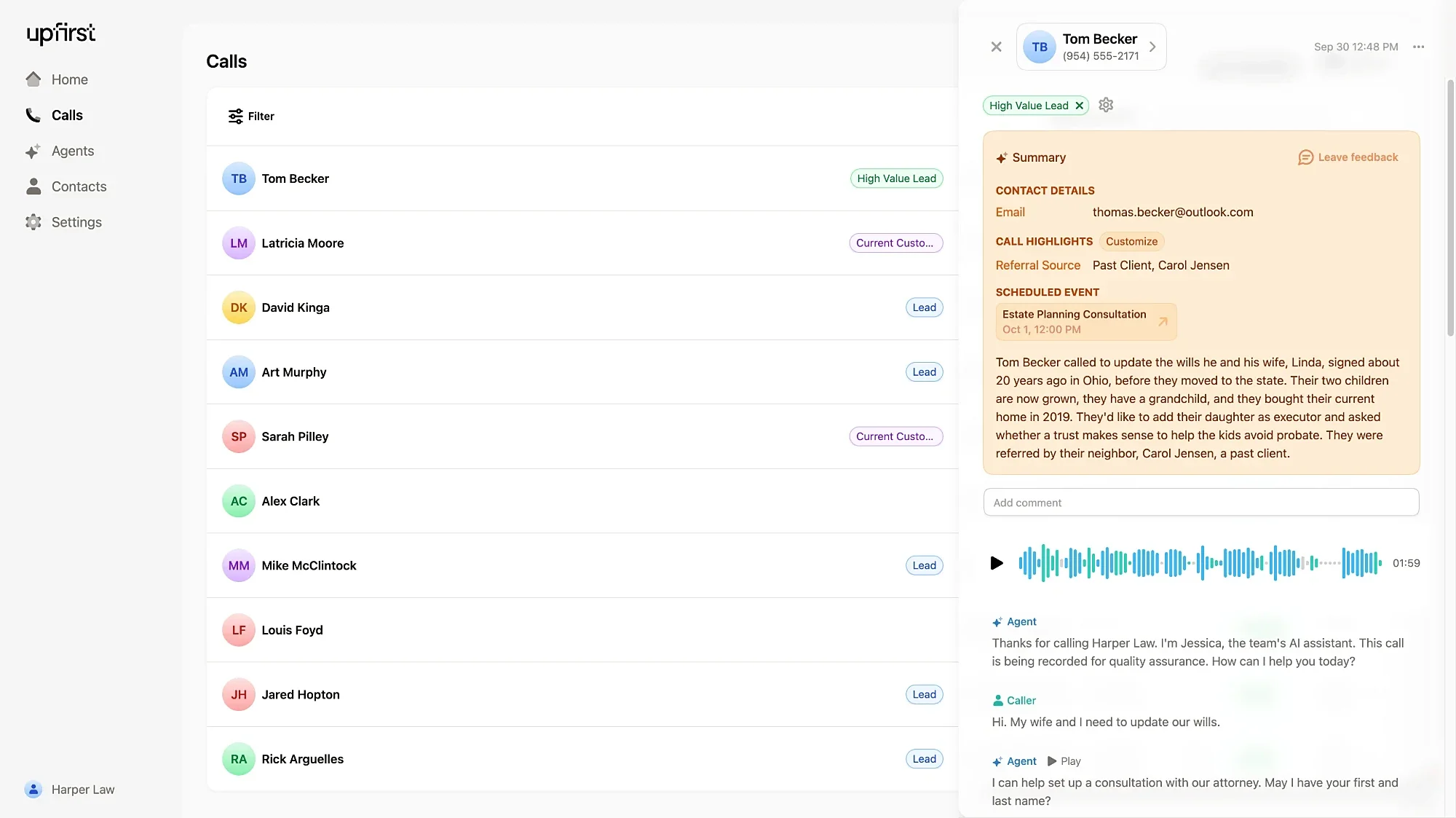
The Upfirst dashboard, where calls and text conversations are answered by AI.

How it works

Set up your SMS chatbot in minutes

1. Train it

Add your hours, services, prices and common questions, or import a page from your website.

2. Choose your number

Use the local number that comes with your account, or ask us to host texting on the number you already have.

3. Turn on AI text replies

Decide when the AI should hand a conversation to your team, then send a test text from your own phone.

What an AI SMS chatbot does

An AI SMS chatbot replies to the text messages your customers send, using what it knows about your business. Older SMS chatbots match keywords and follow a script. An AI text message chatbot reads the whole message and writes a reply that fits the question. Some tools call it an AI SMS agent or an SMS bot.

Businesses use one to answer common questions, respond to new leads right away, and share booking links. It's different from an auto-reply, which sends everyone the same message. A missed call text back starts the conversation, and the chatbot keeps it going.

Upfirst also works as an SMS answering service, with your team stepping in when a conversation needs them. To compare tools, read our guide to SMS chatbot platforms for small business.

SMS chatbot builders vs. Upfirst

What you compareSMS chatbot builderUpfirst
SetupBuild flows, triggers and templatesWrite what you'd tell a new hire
Phone numberOften needs a Twilio accountYour current number, or one from Upfirst
When a person is neededDepends on the flows you builtHands off when asked, upset, or urgent
Marketing blasts and promo codesYesNo. Upfirst replies to people who contact you.
Phone callsSeparate product, or noneUpfirst can answer your calls too

Use cases

What businesses use SMS AI for

Respond to new leads

A text that waits an hour often goes to the next business on the list. The chatbot replies while the customer still has their phone in hand.

Answer common questions

Hours, prices, service areas and "do you take...?" questions come in all day. The chatbot answers them, and you only step in for the conversations that need you.

Cover nights and weekends

Texts don't stop when you close. The chatbot answers after hours and flags anything urgent for your team.

AI SMS chatbot FAQs

Have a question that isn't answered here? Get in touch with our team.

  • It's software that replies to your customers' text messages for you. It uses AI trained on your business, so it can answer real questions instead of sending a canned reply.

  • A customer texts your business number. The AI reads the message, finds the answer in your training, and replies in about 3 seconds. If the customer asks for a person, or the situation is one you've flagged, it hands the conversation to your team.

  • The AI hands the conversation to your team and can send the customer a message so they know. You can get an alert, and the conversation shows under Needs attention in your inbox.

  • Yes. We can host texting on your existing business number, or you can use the Upfirst number that comes with your account. Texting works on local US and Canadian numbers. Toll-free numbers can't text.

  • Yes. It checks your calendar and books the appointment in the conversation. It can also send your scheduling link.

  • No. Upfirst replies to people who text or call you first. It doesn't send broadcasts, promo codes or cold outreach, and it sends text only, with no pictures.

  • They're unsubscribed from your number right away, and neither you nor the AI can text them again unless they reply START. Upfirst also checks every outgoing text for spam and restricted content, to protect your number.

  • Upfirst has a 14-day free trial that includes 25 texts, and you don't need a credit card to start. Paid plans include unlimited texting.

  • Many chatbot tools charge per message or per conversation. Upfirst plans start at $24.95 a month, and every paid plan includes unlimited texting. See Upfirst pricing for every plan.

  • Yes. Upfirst is one AI answering service for calls, texts, or both, with the same training and the same inbox.

Let your AI SMS chatbot take the next text

Train it on your business in minutes and let it answer the next one. Try Upfirst free for 14 days.